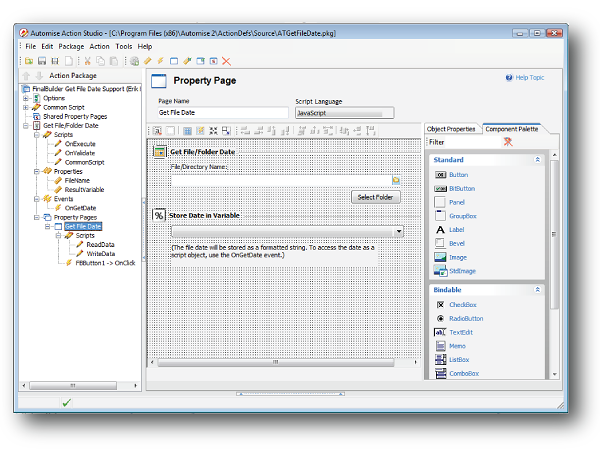
Action Studio is an IDE for writing custom Automise actions. It provides a way
to extend the built-in functionality in Automise. Action Studio is included
free and can be accessed under the "Tools" menu.
With Action Studio you can create an Action Package containing one or more custom
Automise Actions. The action package defines the action's properties, events,
options, and property pages in an XML file format. Actions written in Active Script
are completely contained within the action package, whereas COM and .Net based actions
refer to external dlls and assemblies for the implementation of the action.
Plugins can be developed in any of the following languages:
- Active Script (VBScript, JScript)
- PowerShell
- .Net languages (including IronPython)
What are Automise Plugins?
Automise uses a plugin architecture for the implementation of its actions. Actions
can be either compiled source code or custom plugins. The compiled plugins, which
are shipped with Automise, can be viewed from the Tools->Package Manager
dialog, whereas custom plugins are loaded automatically from a program files subdirectory
named ActionDefs.
Unlike compiled packages, custom plugins are defined by an XML file. Action Studio
can load and save these action package XML files, or you can edit them manually
(if you really want to!). These plugin definition files (with file extension .FBAP)
are stored in the directory Automise\ActionDefs. Automise automatically
loads any .pkg files in the ActionDefs folder when it starts up. Depending on the
type of plugin you are creating, you may require extra files alongside the action
package file; for example, for a .Net based plugin the assembly must be stored in
the Assemblies directory inside the ActionDefs directory so that Automise can
find the referenced assembly.
Automise Professional edition includes a license for Action Studio Professional.
Action Studio Professional has the extra capability to import and export protected
action packages. A protected action package is encrypted with a password so that
others cannot view the action package source. Both Automise Standard and Automise
Professional automatically load up protected action packages and allow use of the
included actions.
See also Actions contributed by the Automise
community